Quick Answer:
Here is how to test a TMR controller for drift. Connect your pad to Joypad Tester and keep both sticks still for ten seconds. If the dot moves, you may drift. Next, spin each stick in a slow circle. A smooth round trail is a good sign. Flat spots or jumps need a closer look.
Introduction:
Knowing how to test a TMR controller for drift can save you money. Maybe your camera slides or your character walks on its own. That is stick drift. Many players think magnetic sticks cannot drift. That is not entirely true.
This guide uses the GameSir Cyclone 2 as an example. It has Mag-Res TMR sticks. You will run a rest test, a circle test, and a game check. Then you will learn how to read your numbers and what to try next.
What Is TMR Controller Stick Drift?
TMR stands for tunneling magnetoresistance. These sticks track a small magnet inside the stick. A sensor reads how that magnet moves.
Drift means the controller sends input while you touch nothing. Your player may creep forward. A menu may jump around.
A TMR controller can still drift. Bad calibration, dust, worn parts, or firmware bugs can all cause it. A tester shows the input. It cannot show the cause.
TMR vs Hall Effect: What Is the Difference?
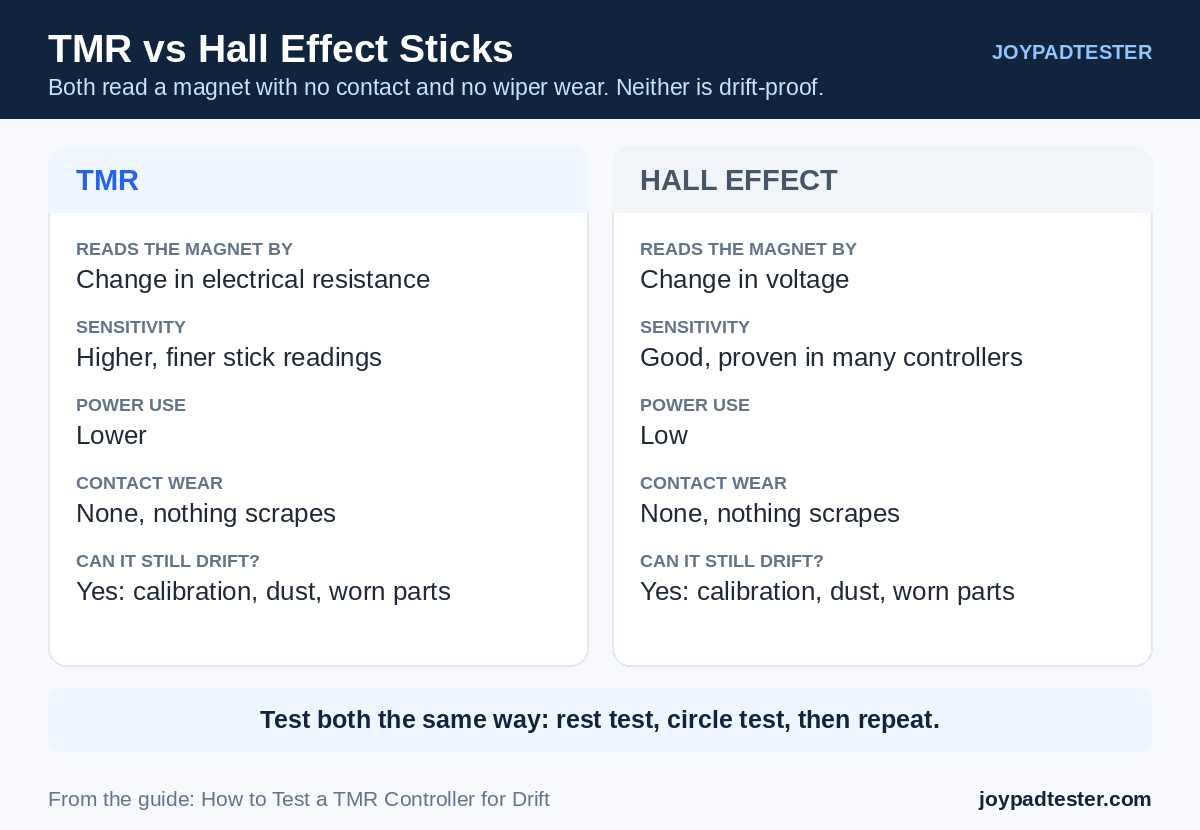
Both sensor types use magnets, so neither wears like an old potentiometer stick. The main difference is how the sensor reads the magnet. Hall effect sensors read the magnetic field as a voltage. TMR sensors read it as a change in electrical resistance, which can be more sensitive. GameSir says its Mag-Res TMR sticks pair low power use with high durability. Still, neither type is drift-proof, so test both the same way.
What You Need for a TMR Joystick Test
- A TMR controller with enough battery, such as the GameSir Cyclone 2
- A PC with an up-to-date browser
- A USB cable or a steady Bluetooth link
- An online gamepad tester like JoyPadTester
Start with the cable. It rules out wireless problems
How to Test TMR Controller for Drift Step by Step
Step 1: Connect the Controller
Plug the Cyclone 2 into your PC with a USB-C cable. Bluetooth works too, but wired is steadier.
Step 2: Open the Online Gamepad Tester
Open JoyPadTester in your browser. Press any button so the page can see your pad. Online testers rely on the Gamepad API, which lets a browser read button and stick input. MDN explains how it works in its Gamepad API guide.
Step 3: Run the Rest Test
Set the controller on a flat table. Let go of both sticks. Watch the screen for about ten seconds.
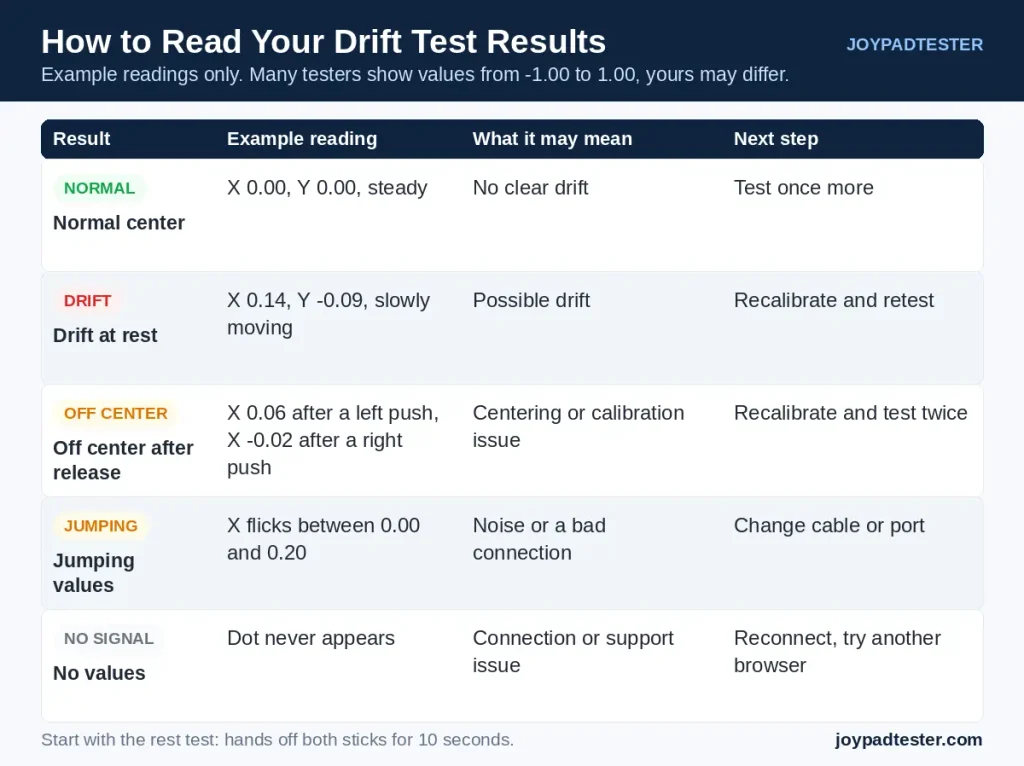
This simple controller drift test matters most. A steady dot near the center is normal. A dot that creeps or jumps points to drift. One tiny shift proves nothing, so repeat the test a few times.
Step 4: Run a Joystick Input Test
Test one stick at a time. Push it up, down, left, and right. Let go each time. The dot should follow your thumb and settle near the center. Then repeat with the other stick.
Circularity Test: Spin the Stick and Read the Circle
Push one stick to its edge and spin it in three slow, full circles. Keep the pressure even, then watch the trail.
A good circle looks round and smooth. It reaches the edge all the way around. Some controllers have a notched gate, so slight corners can be normal.
A bad circle tells you something:
- Flat sides: the stick may not reach full range in that direction.
- Jagged or wobbly line: the signal may be noisy, or the stick may be loose.
- Circle shifted off center: the center point is likely wrong, which points to calibration.
- Gaps or sudden jumps: the sensor or the connection may be failing.
Repeat the test on the other stick and compare the two shapes.
Repeat the Test and Check a Game
Run the rest test again after the circle test. One odd reading means little. A problem that keeps returning matters more. If you can, try both USB and Bluetooth. If the issue shows on only one, blame the connection first.
Then open a game and leave the stick alone. Many games use a deadzone, which ignores tiny stick input near the center. So a tester may show movement you never feel in a game. If drift shows in only one game, check that game’s settings before blaming the hardware.
TMR Controller Calibration: Official Steps for the Cyclone 2
Calibration helps the controller relearn the center and range of each stick. The GameSir Cyclone 2 manual gives these steps:
- Hold the View, Menu and Home buttons together until the Home indicator starts to blink white slowly.
- Without touching the triggers or sticks, press the A button.
- Press LT and RT all the way down, then rotate both sticks in three full circles.
- Press the A button again.
These steps come from the official GameSir Cyclone 2 manual. Other models use different steps, so follow your own maker’s guide. After calibration, run the rest test again.
Other Ways to Fix Stick Drift
- Reconnect: Unplug the pad, or switch Bluetooth off and on, then test again.
- Raise the deadzone: A bigger deadzone hides small drift. It does not repair the stick.
- Contact the maker: If drift stays after many tests, ask the maker or a repair shop. Check your warranty before you open the pad.
Common Mistakes to Avoid
- Touching the stick during the rest test
- Calling every tiny shift a fault
- Trusting a single reading
- Treating a deadzone change as a repair
FAQs
How do I test a TMR controller for drift?
Connect the pad, open an online gamepad tester, and leave both sticks alone for ten seconds. Then run the circle test on each stick. Repeat everything a few times before you decide.
Can a TMR controller still develop stick drift?
Yes. Magnetic sensing helps durability, but calibration problems, firmware bugs, dust, and worn parts can still cause drift.
Does a small joystick movement mean drift?
Not always. Small shifts are common, and each controller reports input differently. Test a few times and see if the movement keeps happening.
What is a circularity test?
You spin a stick around its full edge and watch the trail. A smooth round shape is good. Flat sides, jagged lines, or an off-center circle point to a problem.
Can calibration fix TMR controller drift?
It can help when wrong center settings cause the drift. It cannot fix damaged hardware. Follow your maker’s steps for your exact model.
Why is my controller not showing in the tester?
The cable may be loose, or your browser may not have detected the pad. Reconnect it, press any button, or try another browser.
Is TMR better than the Hall effect for stick drift?
TMR can be more sensitive and use less power, but neither type is drift-proof. Real results depend on the stick design, calibration, and build quality.
Conclusion
Now you know how to test a TMR controller for drift in a few minutes. Start with the rest test, then spin each stick and compare the circles. If the readings look wrong, recalibrate with your maker’s steps and test again. Still seeing drift? Contact the maker with your results before paying for repairs. Open Joypad Tester and check your sticks tonight.
Sources: MDN: Using the Gamepad API | GameSir Cyclone 2 Manual